Create & Edit Images Instantly with Grok Imagine

Try Grok Imagine
Skip to main content
Imagen
Try Stable Diffusion 3 Free

Stable Diffusion 3 API — Next-Gen Image Generation

Access Stable Diffusion 3 on ModelsLab. The latest generation of Stability AI's text-to-image model with improved typography, composition, and prompt adherence. Try SD3 free or integrate via API.

AI background remover showing a clean, transparent background result.

Trusted by

Google logo
Salesforce logo
Amazon logo
IBM logo
Adobe logo
Sony logo
Google logo
Salesforce logo
Amazon logo
IBM logo
Adobe logo
Sony logo
Google logo
Salesforce logo
Amazon logo
IBM logo
Adobe logo
Sony logo
Google logo
Salesforce logo
Amazon logo
IBM logo
Adobe logo
Sony logo

1B+

Images Processed Monthly

500K+

Active Developers

5K+

Discord Community Members

300+

Available AI APIs

Stable Diffusion 3 Capabilities

The most advanced Stable Diffusion model with improved prompt understanding, typography, and composition.

Improved Typography

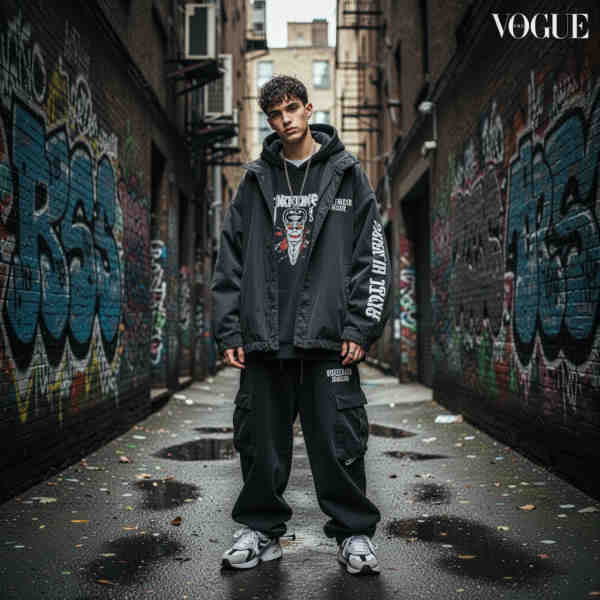
SD3 handles text in images natively — render logos, signs, and labels accurately. Unlike previous versions, Stable Diffusion 3 understands text prompts that include specific words and letters, generating readable text within images.

Enhanced Composition

Better spatial understanding for complex multi-subject scenes. SD3 accurately positions multiple objects and characters according to detailed prompts, maintaining correct spatial relationships and scene coherence.

Superior Prompt Following

SD3 follows long, detailed prompts with higher fidelity than previous versions. Specify intricate scenes, art styles, lighting conditions, and composition details — SD3 understands and executes complex creative instructions.

Multiple Aspect Ratios

Generate images in landscape, portrait, square, and custom aspect ratios. SD3 natively supports various aspect ratios without cropping or distortion, perfect for social media, print, and web content.


Improved Typography
Example of AI outpainting result

The most advanced Stable Diffusion model — accessible via playground and API on ModelsLab.

How Stable Diffusion 3 Works

Generate images with SD3 in three simple steps.

Step 1: Enter Your Prompt

Enter your text prompt with optional parameters like aspect ratio, style modifiers, and negative prompts. SD3 accepts detailed creative directions and understands complex scene descriptions.

Step 2: SD3 Generates Your Image

Stable Diffusion 3 processes your prompt using its advanced architecture. The model generates high-quality images in seconds with improved composition, typography, and prompt adherence.

Step 3: Download or Retrieve via API

Download your generated image directly or retrieve it via API endpoint. Results are available immediately with full resolution and transparency support where applicable.

Why Use Stable Diffusion 3 on ModelsLab?

  1. Latest Stable Diffusion model with improved architecture
  2. Native text rendering for logos, signs, and labels
  3. Enhanced multi-subject composition and spatial understanding
  4. Superior prompt adherence for complex instructions
  5. Multiple aspect ratios without distortion
  6. Fast generation — images ready in seconds
Abstract background for AI outpainting features list
  1. Negative prompts for fine-tuned control
  2. RESTful API with Python and JavaScript SDKs
  3. GDPR-compliant — no prompts stored after generation
  4. Enterprise-grade GPU infrastructure
  5. 24/7 developer support
  6. No questions asked refund policy

Our Popular Use Cases

Stable Diffusion 3 powers:

Create original marketing visuals, social media graphics, and advertising assets. SD3's typography capabilities make it perfect for promotional content with text overlays, logos, and branded elements.

Marketing & Advertising

Your Data is Secure: GDPR Compliant AI Services

ModelsLab GDPR Compliance Certification Badge

GDPR Compliant

Flexible Pricing for Your AI Design & Visualization Needs

Choose the plan that fits your creative or development workflow. Cancel anytime.

Coming Soon

We are making some changes to our pricing, please check back later.

Get Expert Support in Seconds - We're Here to Help

Want to know more? You can email us anytime at [email protected]

View Docs

Explore Our Other Solutions

Unlock your creative potential and scale your business with ModelsLab's comprehensive suite of AI-powered solutions. Discover tools designed for innovation and growth.

Explore Plugins for Pro

Our plugins are designed to work with the most popular content creation software:

AI playground interface preview

Make Your Own Apps using
ModelsLab
API

Use Our API to Build apps, Make Great AI Art, Create Awesome Videos and generate sound with ease!

AI playground interface preview