
For business inquires, commercial licensing, custom models, and consultation contact me under [email protected]
Join Juggernaut now on X/Twitter
Juggernaut is available on the new Auto1111 Forge on RunDiffusion
JuggernautXL V9 + RunDiffusion Photo 2 on Hugging Face
Juggernaut + RunDiffusion Photo2 Lightning 4 Steps on Hugging Face
A big thanks for Version 9 goes to RunDiffusion (Photo Model) and Adam, who diligently helped me test :) (Leave some love for them ;) )
I'm back so quickly :D
This time I'll spare you a lot of talk. Over the past 2 months, there has been repeated demand for a Turbo and/or LCM checkpoint. However, I wasn't completely convinced by either option. The Lightning LoRA's seem a bit more mature to me and ultimately delivered the best results in tests among these 3 options. Additionally, the fact that I don't have to change the license here is certainly an additional plus for me and for you :)
In the end, I decided to take the first step for the 4 Steps LoRA and merged it with Juggernaut V9. However, I will probably also release the 8 Steps version in the next few days. Regarding the fundamental quality, I still recommend the full V9 checkpoint for the best possible quality. But especially for people with less hardware power, this version will benefit them and they will be able to generate images very quickly :) So if you haven't yet had the pleasure of experiencing Juggernaut, this might be the perfect opportunity :)
Recommended Settings for the Lightning Version:
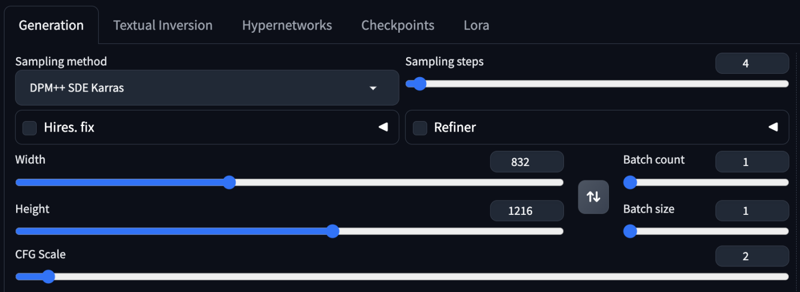
Res: 832*1216
Sampler: DPM++ SDE
Steps: 4-6
CFG: 1-2
Negative: Start with no negative, and add afterwards the Stuff you don´t wanna see in that image.
HiRes: 4x_NMKD-Siax_200k with 2 Steps and 0.35 Denoise + 1.5 Upscale
Recommended Settings for the Normal Version:
Res: 832*1216
Sampler: DPM++ 2M Karras
Steps: 30-40
CFG: 3-7 (less is a bit more realistic)
Negative: Start with no negative, and add afterwards the Stuff you don´t wanna see in that image. I don´t recommend using my Negative Prompt, i simply use it because i am lazy :D
VAE is already Baked In
HiRes: 4xNMKD-Siax_200k with 15 Steps and 0.3 Denoise + 1.5 Upscale
And a few keywords/tokens that I regularly use in training, which might help you achieve the optimal result from the version:
-
Architecture Photography
-
Wildlife Photography
-
Car Photography
-
Food Photography
-
Interior Photography
-
Landscape Photography
-
Hyperdetailed Photography
-
Cinematic
-
Movie Still
-
Mid Shot Photo
-
Full Body Photo
-
Skin Details
And now, have fun trying it out. As always, I'm eagerly waiting for your pictures in the Gallery :)
If you liked the model, please leave a review. In the end, that's what helps me the most as a creator on CivitAI. :)
Last but not least, I'd like to thank a few people without whom Juggernaut XL probably wouldn't have come to fruition: